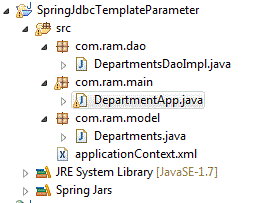
Update using JdbcTemplate

Note: <context:annotation-config/>, <context:component-scan>, @Component and @Autowired are explained under the "Points to ponder" section of the post JbdcTemplate example
Below program is an example of how to update record into data base using JdbcTempalte.
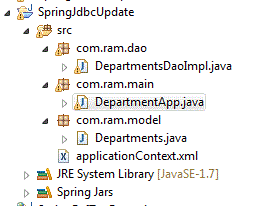
File: com.ram.model.Departments.java
package com.ram.model;

public class Departments {
 private int department_id;
 private String department_name;
 private int manager_id;
 private int location_id;
 
 public int getDepartment_id() {
  return department_id;
 }
 public void setDepartment_id(int department_id) {
  this.department_id = department_id;
 }
 public String getDepartment_name() {
  return department_name;
 }
 public void setDepartment_name(String department_name) {
  this.department_name = department_name;
 }
 public int getManager_id() {
  return manager_id;
 }
 public void setManager_id(int manager_id) {
  this.manager_id = manager_id;
 }
 public int getLocation_id() {
  return location_id;
 }
 public void setLocation_id(int location_id) {
  this.location_id = location_id;
 }
}

Next create applicationContext.xml file under src. The file is given below.
<?xml version="1.0" encoding="UTF-8"?>
<beans xmlns="http://www.springframework.org/schema/beans"
       xmlns:xsi="http://www.w3.org/2001/XMLSchema-instance"
       xmlns:aop="http://www.springframework.org/schema/aop"
       xmlns:context="http://www.springframework.org/schema/context"
       xsi:schemaLocation="http://www.springframework.org/schema/beans 
       http://www.springframework.org/schema/beans/spring-beans-3.0.xsd 
       http://www.springframework.org/schema/context 
       http://www.springframework.org/schema/context/spring-context-3.0.xsd
       http://www.springframework.org/schema/aop 
       http://www.springframework.org/schema/aop/spring-aop-3.0.xsd">
 
 <context:annotation-config/>
 
 <context:component-scan base-package="com.ram.dao"></context:component-scan>
 
 <bean id="dataSource" class="org.springframework.jdbc.datasource.DriverManagerDataSource">
  <property name="driverClassName" value="oracle.jdbc.driver.OracleDriver"></property>
  <property name="url" value="dbc:oracle:thin:@localhost:1521:xe"></property>
  <property name="username" value="hr"></property>
  <property name="password" value="hr"></property>
 </bean>
 
</beans>
File: com.ram.dao.DepartmentsDaoImpl.java
package com.ram.dao;

import javax.sql.DataSource;

import org.springframework.beans.factory.annotation.Autowired;
import org.springframework.jdbc.core.JdbcTemplate;
import org.springframework.stereotype.Component;

@Component
public class DepartmentsDaoImpl {
 private JdbcTemplate jdbcTemplate;
 private DataSource dataSource;
 
 public void insertDepartment(){
  String sql = "insert into departments(department_id, department_name, location_id) values (?,?,?)";
  jdbcTemplate.update(sql, new Object[]{280, "ABC", 1700});
 }
 
 public JdbcTemplate getJdbcTemplate() {
  return jdbcTemplate;
 }
 public void setJdbcTemplate(JdbcTemplate jdbcTemplate) {
  this.jdbcTemplate = jdbcTemplate;
 }
 public DataSource getDataSource() {
  return dataSource;
 }
 @Autowired
 public void setDataSource(DataSource dataSource) {
  this.jdbcTemplate = new JdbcTemplate(dataSource);
 }
 
}

File: com.ram.main.DepartmentApp.java
package com.ram.main;

import org.springframework.context.ApplicationContext;
import org.springframework.context.support.ClassPathXmlApplicationContext;

import com.ram.dao.DepartmentsDaoImpl;

public class DepartmentApp {
 public static void main(String[] args) {
  ApplicationContext context = new ClassPathXmlApplicationContext("applicationContext.xml");
  DepartmentsDaoImpl dao = context.getBean("departmentsDaoImpl", DepartmentsDaoImpl.class);
  
  dao.insertDepartment();
 }
}

Execute DepartmentApp.java file. Output is given below.

Using RowMapper

Note: <context:annotation-config/>, <context:component-scan>, @Component and @Autowired are explained under the "Points to ponder" section of the post JbdcTemplate example
Below program is an example of how to get all the columns and all the rows from the database using RowMapper.
File: com.ram.model.Departments.java
package com.ram.model;

public class Departments {
 private int department_id;
 private String department_name;
 private int manager_id;
 private int location_id;
 
 public int getDepartment_id() {
  return department_id;
 }
 public void setDepartment_id(int department_id) {
  this.department_id = department_id;
 }
 public String getDepartment_name() {
  return department_name;
 }
 public void setDepartment_name(String department_name) {
  this.department_name = department_name;
 }
 public int getManager_id() {
  return manager_id;
 }
 public void setManager_id(int manager_id) {
  this.manager_id = manager_id;
 }
 public int getLocation_id() {
  return location_id;
 }
 public void setLocation_id(int location_id) {
  this.location_id = location_id;
 }
}

Next create applicationContext.xml file under src. The file is given below.
<?xml version="1.0" encoding="UTF-8"?>
<beans xmlns="http://www.springframework.org/schema/beans"
       xmlns:xsi="http://www.w3.org/2001/XMLSchema-instance"
       xmlns:aop="http://www.springframework.org/schema/aop"
       xmlns:context="http://www.springframework.org/schema/context"
       xsi:schemaLocation="http://www.springframework.org/schema/beans 
       http://www.springframework.org/schema/beans/spring-beans-3.0.xsd 
       http://www.springframework.org/schema/context 
       http://www.springframework.org/schema/context/spring-context-3.0.xsd
       http://www.springframework.org/schema/aop 
       http://www.springframework.org/schema/aop/spring-aop-3.0.xsd">
 
 <context:annotation-config/>
 
 <context:component-scan base-package="com.ram.dao"></context:component-scan>
 
 <bean id="dataSource" class="org.springframework.jdbc.datasource.DriverManagerDataSource">
  <property name="driverClassName" value="oracle.jdbc.driver.OracleDriver"></property>
  <property name="url" value="dbc:oracle:thin:@localhost:1521:xe"></property>
  <property name="username" value="hr"></property>
  <property name="password" value="hr"></property>
 </bean>
 
</beans>
File: com.ram.dao.DepartmentsDaoImpl.java
package com.ram.dao;

import java.sql.ResultSet;
import java.sql.SQLException;
import java.util.List;
import javax.sql.DataSource;

import org.springframework.beans.factory.annotation.Autowired;
import org.springframework.jdbc.core.JdbcTemplate;
import org.springframework.jdbc.core.RowMapper;
import org.springframework.stereotype.Component;
import com.ram.model.Departments;

@Component
public class DepartmentsDaoImpl {
 private DataSource dataSource;
 private JdbcTemplate jdbcTemplate;

 public List<Departments> getAllDepartments(){
  String query = "select * from departments";
  return jdbcTemplate.query(query, new DepartmentMapper());
 }

 public static final class DepartmentMapper implements RowMapper{
  @Override
  public Departments mapRow(ResultSet resultSet, int rowNum) throws SQLException{
   Departments departments = new Departments();
   departments.setDepartment_id(resultSet.getInt("department_id"));
   departments.setDepartment_name(resultSet.getString("department_name"));
   departments.setManager_id(resultSet.getInt("manager_id"));
   departments.setLocation_id(resultSet.getInt("location_id"));
   return departments;
  }
 }

 public DataSource getDataSource() {
  return dataSource;
 }
 @Autowired
 public void setDataSource(DataSource dataSource) {
  this.jdbcTemplate = new JdbcTemplate(dataSource);
 }
 public JdbcTemplate getJdbcTemplate() {
  return jdbcTemplate;
 }
 public void setJdbcTemplate(JdbcTemplate jdbcTemplate) {
  this.jdbcTemplate = jdbcTemplate;
 }
}


File: com.ram.main.DepartmentApp.java
package com.ram.main;

import java.util.List;
import org.springframework.context.ApplicationContext;
import org.springframework.context.support.ClassPathXmlApplicationContext;
import com.ram.dao.DepartmentsDaoImpl;
import com.ram.model.Departments;

public class DepartmentApp {
 public static void main(String[] args) {
  ApplicationContext context = new ClassPathXmlApplicationContext("applicationContext.xml");
  DepartmentsDaoImpl dao = context.getBean("departmentsDaoImpl", DepartmentsDaoImpl.class);
  List<Departments> departments = dao.getAllDepartments();
  
  for(Departments dept : departments){
   System.out.print("Department_id = "+dept.getDepartment_id());
   System.out.print("\tDepartment_name = "+dept.getDepartment_name());
   System.out.print("\tManager_id = "+dept.getManager_id());
   System.out.println("\tLocation_id = "+dept.getLocation_id());
  }
 }
}

Execute DepartmentApp.java file. Output is given below.

Passing parameters

Note: <context:annotation-config/>, <context:component-scan>, @Component and @Autowired are explained under the "Points to ponder" section of the post JbdcTemplate example
Below program is an example of how to get the data from the database using JdbcTemplateby passing a parameter.
File: com.ram.model.Departments.java
package com.ram.model;

public class Departments {
 private int department_id;
 private String department_name;
 private int manager_id;
 private int location_id;
 
 public int getDepartment_id() {
  return department_id;
 }
 public void setDepartment_id(int department_id) {
  this.department_id = department_id;
 }
 public String getDepartment_name() {
  return department_name;
 }
 public void setDepartment_name(String department_name) {
  this.department_name = department_name;
 }
 public int getManager_id() {
  return manager_id;
 }
 public void setManager_id(int manager_id) {
  this.manager_id = manager_id;
 }
 public int getLocation_id() {
  return location_id;
 }
 public void setLocation_id(int location_id) {
  this.location_id = location_id;
 }
}

Next create applicationContext.xml file under src. The file is given below.
<?xml version="1.0" encoding="UTF-8"?>
<beans xmlns="http://www.springframework.org/schema/beans"
       xmlns:xsi="http://www.w3.org/2001/XMLSchema-instance"
       xmlns:aop="http://www.springframework.org/schema/aop"
       xmlns:context="http://www.springframework.org/schema/context"
       xsi:schemaLocation="http://www.springframework.org/schema/beans 
       http://www.springframework.org/schema/beans/spring-beans-3.0.xsd 
       http://www.springframework.org/schema/context 
       http://www.springframework.org/schema/context/spring-context-3.0.xsd
       http://www.springframework.org/schema/aop 
       http://www.springframework.org/schema/aop/spring-aop-3.0.xsd">
 
 <context:annotation-config/>
 
 <context:component-scan base-package="com.ram.dao"></context:component-scan>
 
 <bean id="dataSource" class="org.springframework.jdbc.datasource.DriverManagerDataSource">
  <property name="driverClassName" value="oracle.jdbc.driver.OracleDriver"></property>
  <property name="url" value="dbc:oracle:thin:@localhost:1521:xe"></property>
  <property name="username" value="hr"></property>
  <property name="password" value="hr"></property>
 </bean>
 
</beans>
File: com.ram.dao.DepartmentsDaoImpl.java
package com.ram.dao;

import javax.sql.DataSource;

import org.springframework.beans.factory.annotation.Autowired;
import org.springframework.jdbc.core.JdbcTemplate;
import org.springframework.stereotype.Component;

@Component
public class DepartmentsDaoImpl {
 private DataSource dataSource;
 private JdbcTemplate jdbcTemplate;
 
 //Method to get the Department_name given department_id
 public String getDepartmentName(int department_id){
  String sql = "select department_name from departments where department_id = ?";
  return jdbcTemplate.queryForObject(sql, new Object[] {department_id}, String.class);
 }
 
 public DataSource getDataSource() {
  return dataSource;
 }
 
 @Autowired
 public void setDataSource(DataSource dataSource) {
  this.jdbcTemplate = new JdbcTemplate(dataSource);
 }
 public JdbcTemplate getJdbcTemplate() {
  return jdbcTemplate;
 }
 public void setJdbcTemplate(JdbcTemplate jdbcTemplate) {
  this.jdbcTemplate = jdbcTemplate;
 }
 
}

File: com.ram.main.DepartmentApp.java
package com.ram.main;

import org.springframework.context.ApplicationContext;
import org.springframework.context.support.ClassPathXmlApplicationContext;

import com.ram.dao.DepartmentsDaoImpl;

public class DepartmentApp {
 public static void main(String[] args) {
  ApplicationContext context = new ClassPathXmlApplicationContext("applicationContext.xml");
  DepartmentsDaoImpl departments = context.getBean("departmentsDaoImpl", DepartmentsDaoImpl.class);
  System.out.println("Depatment name for department_id 30 is "+departments.getDepartmentName(30));
 }
}


Execute DepartmentApp.java file. Output is given below.

JbdcTemplate example

Points to ponder:
  • <context:annotation-config/> : It is used to activate annotations in beans already registered in the application context.
  • <context:component-scan/> : It scans packages to find and register beans within the application context.
  • @Component : It is one of several stereotype annotations. @Component is a general-purpose stereotype annotation indicating that the class is a Spring component
  • @Autowired : @Autowired indicates that spring should inject dependency, based on its type or based on its name if used with the @Qualifier annotation.
Below program is an example of how to connect to data base using JdbcTemplate.
File: com.ram.model.Departments.java
package com.ram.model;

public class Departments {
 private int department_id;
 private String department_name;
 private int manager_id;
 private int location_id;
 
 public int getDepartment_id() {
  return department_id;
 }
 public void setDepartment_id(int department_id) {
  this.department_id = department_id;
 }
 public String getDepartment_name() {
  return department_name;
 }
 public void setDepartment_name(String department_name) {
  this.department_name = department_name;
 }
 public int getManager_id() {
  return manager_id;
 }
 public void setManager_id(int manager_id) {
  this.manager_id = manager_id;
 }
 public int getLocation_id() {
  return location_id;
 }
 public void setLocation_id(int location_id) {
  this.location_id = location_id;
 }
}

Next create applicationContext.xml file under src. The file is given below.
<?xml version="1.0" encoding="UTF-8"?>
<beans xmlns="http://www.springframework.org/schema/beans"
       xmlns:xsi="http://www.w3.org/2001/XMLSchema-instance"
       xmlns:aop="http://www.springframework.org/schema/aop"
       xmlns:context="http://www.springframework.org/schema/context"
       xsi:schemaLocation="http://www.springframework.org/schema/beans 
       http://www.springframework.org/schema/beans/spring-beans-3.0.xsd 
       http://www.springframework.org/schema/context 
       http://www.springframework.org/schema/context/spring-context-3.0.xsd
       http://www.springframework.org/schema/aop 
       http://www.springframework.org/schema/aop/spring-aop-3.0.xsd">
 
 <context:annotation-config/>
 
 <context:component-scan base-package="com.ram.dao"></context:component-scan>
 
 <bean id="dataSource" class="org.springframework.jdbc.datasource.DriverManagerDataSource">
  <property name="driverClassName" value="oracle.jdbc.driver.OracleDriver"></property>
  <property name="url" value="dbc:oracle:thin:@localhost:1521:xe"></property>
  <property name="username" value="hr"></property>
  <property name="password" value="hr"></property>
 </bean>
 
</beans>
File: com.ram.dao.DepartmentsDaoImpl.java
package com.ram.dao;

import javax.sql.DataSource;

import org.springframework.beans.factory.annotation.Autowired;
import org.springframework.jdbc.core.JdbcTemplate;
import org.springframework.stereotype.Component;

@Component
public class DepartmentsDaoImpl {
 private DataSource dataSource;
 private JdbcTemplate jdbcTemplate;
 
 //Method to get the number of rows in departments table
 public int getDepartmentsCount(){
  String sql = "select count(*) from departments";
  return jdbcTemplate.queryForInt(sql);
 }
 
 public DataSource getDataSource() {
  return dataSource;
 }
 
 @Autowired
 public void setDataSource(DataSource dataSource) {
  this.jdbcTemplate = new JdbcTemplate(dataSource);
 }
 public JdbcTemplate getJdbcTemplate() {
  return jdbcTemplate;
 }
 public void setJdbcTemplate(JdbcTemplate jdbcTemplate) {
  this.jdbcTemplate = jdbcTemplate;
 }
 
}

File: com.ram.main.DepartmentsDao.java
package com.ram.main;

import org.springframework.context.ApplicationContext;
import org.springframework.context.support.ClassPathXmlApplicationContext;

import com.ram.dao.DepartmentsDaoImpl;

public class DepartmentsDao {
 public static void main(String[] args) {
  ApplicationContext context = new ClassPathXmlApplicationContext("applicationContext.xml");
  DepartmentsDaoImpl departments = context.getBean("departmentsDaoImpl", DepartmentsDaoImpl.class);
  System.out.println("Total number of rows in Departments table = "+departments.getDepartmentsCount());
 }
}

Execute DepartmentsDao.java file. Output is given below.

Criteria API example

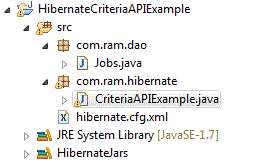
Criteria API is yet another way of retrieving values from database provided by hibernate. Using HQL has some disadvantages. If we write complex queries using HQL, at some point of time these queries look much similar to our traditional sql queries. To overcome with this issue, hibernate has provided us with the criteria api. Criteria is a simplified API for retrieving by composing criterion objects. This is very convenient approach for functionality like "search" screens where there is a variable number for conditions to be placed upon the result search.Below is a simple example of how to use a criteria API.
<?xml version='1.0' encoding='utf-8'?>
<!DOCTYPE hibernate-configuration PUBLIC
        "-//Hibernate/Hibernate Configuration DTD 3.0//EN"
        "http://www.hibernate.org/dtd/hibernate-configuration-3.0.dtd">

<hibernate-configuration>

    <session-factory>

        <!-- Database connection settings -->
        <property name="connection.driver_class">oracle.jdbc.driver.OracleDriver</property>
        <property name="connection.url">jdbc:oracle:thin:@localhost:1521:xe</property>
        <property name="connection.username">hr</property>
        <property name="connection.password">hr</property>

        <!-- JDBC connection pool (use the built-in) -->
        <property name="connection.pool_size">1</property>

        <!-- SQL dialect -->
        <property name="dialect">org.hibernate.dialect.OracleDialect</property>

        <!-- Disable the second-level cache  -->
        <property name="cache.provider_class">org.hibernate.cache.NoCacheProvider</property>

        <!-- Echo all executed SQL to stdout -->
        <property name="show_sql">true</property>

        <!-- Drop and re-create the database schema on startup -->
        <property name="hbm2ddl.auto">create</property>

        <!-- Names the annotated entity class -->
        <mapping class="com.ram.dao.Jobs"/>

    </session-factory>

</hibernate-configuration>
File: com.ram.dao.Jobs.java
package com.ram.dao;

import javax.persistence.Entity;
import javax.persistence.Id;

@Entity
public class Jobs {
 @Id
 private String job_id;
 private String job_title;
 private int min_salary;
 private int max_salary;
 
 public String getJob_id() {
  return job_id;
 }
 public void setJob_id(String job_id) {
  this.job_id = job_id;
 }
 public String getJob_title() {
  return job_title;
 }
 public void setJob_title(String job_title) {
  this.job_title = job_title;
 }
 public int getMin_salary() {
  return min_salary;
 }
 public void setMin_salary(int min_salary) {
  this.min_salary = min_salary;
 }
 public int getMax_salary() {
  return max_salary;
 }
 public void setMax_salary(int max_salary) {
  this.max_salary = max_salary;
 }
}

File: com.ram.hibernate.CriteriaAPIExample.java
package com.ram.hibernate;

import java.util.List;
import org.hibernate.Criteria;
import org.hibernate.Session;
import org.hibernate.SessionFactory;
import org.hibernate.cfg.Configuration;
import org.hibernate.criterion.Restrictions;

import com.ram.dao.Jobs;

public class CriteriaAPIExample {
 public static void main(String[] args) {
  SessionFactory sessionFactory = new Configuration().configure().buildSessionFactory();
  Session session = sessionFactory.openSession();
  session.beginTransaction();
  
  Criteria criteria = session.createCriteria(Jobs.class);
  criteria.add(Restrictions.eq("job_id", "MK_MAN"));
  
  List jobs = (List) criteria.list();
  
  for(Jobs job: jobs){
   System.out.println("Jon Id: "+job.getJob_id());
   System.out.println("Job Title "+job.getJob_title());
   System.out.println("Minimum Salary "+job.getMin_salary());
   System.out.println("Maximum Salary "+job.getMax_salary());
  }
  
  session.getTransaction().commit();
  session.close();
 }
}

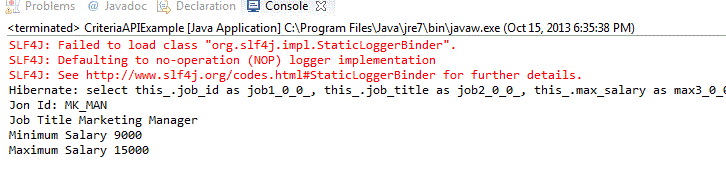
Execute CriteriaAPIExample.java and you get the output as shown below.

Native query example

Instead of using HQL or Hibernate Query Language, hibernate provides us with an annotation where we can use native sql queries i.e., queries that we usually write in our data bases. To achieve this we can make use of "@NamedNativeQuery" annotation. This annotation takes in three parameters. First one being the name of the query with which it should be called in the main program. Second parameter is the native query itself. Third parameter is the name of the class where it needs to store the list of values when the query gets executed. We have not mentioned this parameter in our previous post for the "@NamedQuery" because, for @NamedQuery we have used class name in the query instead of table name. So in this case hibernate knows in which class it needs to store the results. Below is a sample program for the native queries.
<?xml version='1.0' encoding='utf-8'?>
<!DOCTYPE hibernate-configuration PUBLIC
        "-//Hibernate/Hibernate Configuration DTD 3.0//EN"
        "http://www.hibernate.org/dtd/hibernate-configuration-3.0.dtd">

<hibernate-configuration>

    <session-factory>

        <!-- Database connection settings -->
        <property name="connection.driver_class">oracle.jdbc.driver.OracleDriver</property>
        <property name="connection.url">jdbc:oracle:thin:@localhost:1521:xe</property>
        <property name="connection.username">hr</property>
        <property name="connection.password">hr</property>

        <!-- JDBC connection pool (use the built-in) -->
        <property name="connection.pool_size">1</property>

        <!-- SQL dialect -->
        <property name="dialect">org.hibernate.dialect.OracleDialect</property>

        <!-- Disable the second-level cache  -->
        <property name="cache.provider_class">org.hibernate.cache.NoCacheProvider</property>

        <!-- Echo all executed SQL to stdout -->
        <property name="show_sql">true</property>

        <!-- Drop and re-create the database schema on startup -->
        <property name="hbm2ddl.auto">create</property>

        <!-- Names the annotated entity class -->
        <mapping class="com.ram.dao.Student"/>

    </session-factory>

</hibernate-configuration>
File: com.ram.dao.Student.java
package com.ram.dao;

import javax.persistence.Entity;
import javax.persistence.GeneratedValue;
import javax.persistence.Id;
import javax.persistence.NamedNativeQuery;

@Entity
@NamedNativeQuery(name="Student.byName", query="select * from Student where studentname = ?", resultClass=Student.class)
public class Student {
 @Id @GeneratedValue
 private int studentId;
 private String studentName;
 
 public int getStudentId() {
  return studentId;
 }
 public void setStudentId(int studentId) {
  this.studentId = studentId;
 }
 public String getStudentName() {
  return studentName;
 }
 public void setStudentName(String studentName) {
  this.studentName = studentName;
 }
}

File: com.ram.hibernate.HQLParameterExample.java
package com.ram.hibernate;

import java.util.List;

import org.hibernate.Query;
import org.hibernate.Session;
import org.hibernate.SessionFactory;
import org.hibernate.cfg.Configuration;

import com.ram.dao.Student;

public class NamedNativeQueryExample {
 public static void main(String[] args) {
  SessionFactory sessionFactory = new Configuration().configure().buildSessionFactory();
  Session session = sessionFactory.openSession();
  session.beginTransaction();
  
  Query query = session.getNamedQuery("Student.byName");
  query.setString(0, "Student 3");
  List students = (List) query.list();
  
  for(Student stud: students){
   System.out.println("Student Name: "+stud.getStudentName());
  }
  
  session.getTransaction().commit();
  session.close();
 }
}

Execute NamedNativeQueryExample.java and you get the output as shown below.

Named Query example

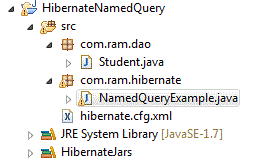
Instead of writing queries in the main program wherer they are executed, hibernate provides us with a way where we can write queries in the entity class using the annotation "@NamedQuery". The @NamedQuery annotation takes 2 parameters. One is the name of the query using which it should be called and the next is the query. Below is a sample program which explains how to use a named query.
<?xml version='1.0' encoding='utf-8'?>
<!DOCTYPE hibernate-configuration PUBLIC
        "-//Hibernate/Hibernate Configuration DTD 3.0//EN"
        "http://www.hibernate.org/dtd/hibernate-configuration-3.0.dtd">

<hibernate-configuration>

    <session-factory>

        <!-- Database connection settings -->
        <property name="connection.driver_class">oracle.jdbc.driver.OracleDriver</property>
        <property name="connection.url">jdbc:oracle:thin:@localhost:1521:xe</property>
        <property name="connection.username">hr</property>
        <property name="connection.password">hr</property>

        <!-- JDBC connection pool (use the built-in) -->
        <property name="connection.pool_size">1</property>

        <!-- SQL dialect -->
        <property name="dialect">org.hibernate.dialect.OracleDialect</property>

        <!-- Disable the second-level cache  -->
        <property name="cache.provider_class">org.hibernate.cache.NoCacheProvider</property>

        <!-- Echo all executed SQL to stdout -->
        <property name="show_sql">true</property>

        <!-- Drop and re-create the database schema on startup -->
        <property name="hbm2ddl.auto">create</property>

        <!-- Names the annotated entity class -->
        <mapping class="com.ram.dao.Student"/>

    </session-factory>

</hibernate-configuration>
File: com.ram.dao.Student.java
package com.ram.dao;

import javax.persistence.Entity;
import javax.persistence.GeneratedValue;
import javax.persistence.Id;
import javax.persistence.NamedQuery;

@Entity
@NamedQuery(name="Student.Id",query="from Student where studentId > ?")
public class Student {
 @Id @GeneratedValue
 private int studentId;
 private String studentName;
 
 public int getStudentId() {
  return studentId;
 }
 public void setStudentId(int studentId) {
  this.studentId = studentId;
 }
 public String getStudentName() {
  return studentName;
 }
 public void setStudentName(String studentName) {
  this.studentName = studentName;
 }
}

File: com.ram.hibernate.HQLParameterExample.java
package com.ram.hibernate;

import java.util.List;

import org.hibernate.Query;
import org.hibernate.Session;
import org.hibernate.SessionFactory;
import org.hibernate.cfg.Configuration;

import com.ram.dao.Student;

public class NamedQueryExample {
 public static void main(String[] args) {
  SessionFactory sessionFactory = new Configuration().configure().buildSessionFactory();
  Session session = sessionFactory.openSession();
  session.beginTransaction();
  
  Query query = session.getNamedQuery("Student.Id");
  query.setInteger(0, 3);
  List<Student> students = (List<Student>) query.list();
  
  for(Student stud: students){
   System.out.print("Student Id : "+stud.getStudentId());
   System.out.println("Student Name: "+stud.getStudentName());
  }
  
  session.getTransaction().commit();
  session.close();
 }
}

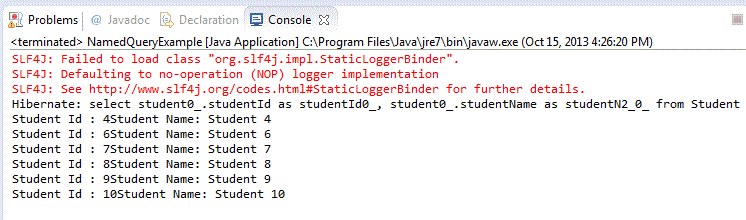
Execute NamedQueryExample.java and you get the output as shown below.