-
What is ORM?Answer: ORM stands for Object Relational Mapping. It is a programming technique for converting data between object oriented programming language and relational database. In simple words it helps in persistence of java objects to tables in the data base.
-
What is Hibernate?Answer: Hibernate is a ORM framework that lets users to map java objects to relational tables using configuration files.
-
What is SessionFactory?Answer: SessionFactory is a factory to create hibernate Session objects. SessionFactory is threadsafe so that many threads can access it concurrently (use the same SessionFactory). A SessionFactory is usually built once at the start up. Below is the code to create a SessionFactory
 //Creates a SessionFactory object
 SessionFactory sessionFactory = new Configuration().configure().buildSessionFactory();
-
What is Session?Answer: Session represents a small unit of work in Hibernate. Session is a light weight object and it is not thread safe that is session objects cannot be shared by multiple threads. Session objects are created by SessionFactory and they are closed when all the work is completed.
 //Creates a SessionFactory object
 SessionFactory sessionFactory = new Configuration().configure().buildSessionFactory();
 //Creates a Session object
 Session session = sessionFactory.openSession();
-
What is first level cache?Answer: First level cache is maintained at the session object. By default hibernate uses first level cache. Caching is used by hibernate to reduce the number of SQL queries it needs to generate within a given transaction.
-
What is second level cache?Answer: Second level cache is associated at the SessionFactory object. The second level cache is available to the complete application. Hibernate first tries to retrieve the objects from first level cache that i.e. from session objects. If it cannot find then it goes to the second level cache which is SessionFactory. If hibernate cannot find objects in SessionFactory then it loads the objects from the database.
-
What is query cache?Answer: Query cache stores results of SQL query. Query cache can be used along with second level cache for improved performance. An example of query cache that hibernate supports is EhCache.
-
What is lazy initialization?Answer: Lazy initialization means, you do not initialize the entire object. You only initialize the first level variables member variables of the object and then you initialize the list only you need the list or only when we access the list. Click here to know more
-
What are the different object states in hibernate?Answer: There are three different object states in hibernate. They are:
- Transient
- Persistent
- Detached
-
Explain the difference between session.lock and session.update in hibernateAnswer: Both session.lock and session.update of session class are used to re-attach an object which has been detached earlier. But session.lock assumes that database is in sync with the detached objects and simply re-attaches the object to the session. Hence session.lock should be used very carefully.
-
What is criteria API?Answer: Criteria is a simplified API for retrieving by composing criterion objects. This is very convenient approach for functionality like "search" screens where there is a variable number for conditions to be placed upon the result search. To know more about criteria api "Click here"

Hibernate interview questions and answers

J K Rowling
The Biography of J K Rowling - "Hard work is the key to success"

Joanne Kathleen Rowling or better known as J.K. Rowling was born on 31 July 1965. Rowling
has a sister who is 2 years younger to her. To keep her sister entertained, Rowling had to
create stories, which was probably the reason why she is one of the most successful story writers.
From an early age J.K. Rowling had an ambition to be a writer. As a child she often wrote
fantasy stories which she would read out to her mother and sister. When she was six, she wrote
down her first story about a rabbit called Rabbit. As a child she was shy and had no sports
abilities, but she had a great love for literature.
After finishing school, her parents encouraged her to study French. She fulfilled her parents
wish by studying French though she preferred to study English. After graduating, she moved to
London and worked in several jobs. One of the jobs were to work as secretary. She soon resigned
from the job because she was not organized and she would be day dreaming while at work. She was
not happy with her life. She has resinged her job, her mother fell ill, she had a difficult relationship
with her father.

Rowling got a job as a English teacher in Portugal. It was here that she met her first husband,
and together they had a child Jessica. The couple split after few years and Rowling was thrown out
of the house. She had no other other choice but to return to England. She had to work in cafes for
full time and as a single parent she had to take care of her child. She struggled to take time out to finish
her first book 'Harry Potter and the Philosopher's Stone'. It took her 7 years to complete the book.
After finishing the book, she sent to many agents. One of the agent had to spend more than a year to find
a publisher. The book was published in 1997 and Rowling was paid an advance of £1500. She also received
a grant from the Scottish arts council, which enabled her to write full time. After the books initial
success in the UK, an American company Scholastic agreed to pay a remarkable £100,000 for the rights
to publish in America. In 1998, Warner Bros secured the film rights for the books, giving a seven figure sum.

Some of the famous quotes by J K Rowling:
- "Anything's possible if you've got enough nerve."
- "It is our choices... that show what we truly are, far more than our abilities."
- "If you want to see the true measure of a man, watch how he treats his inferiors, not his equals."
- "It matters not what someone is born, but what they grow to be."
- "Wit beyond measure is a man’s greatest treasure."
- "The only way out is through."
- "I believe in hard work and luck, and that the first often leads to the second."
Spring MVC Login Page
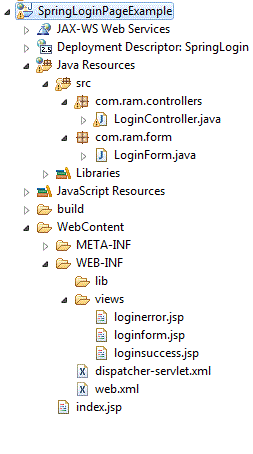
In this post we will see how to create a login page using spring 3. Below two screen shots
are the directory structure and the jar files that are necessary for to run the login
application.

File: WebContent/index.jsp
<%@ page language="java" contentType="text/html; charset=ISO-8859-1"
 pageEncoding="ISO-8859-1"%>

<!DOCTYPE html PUBLIC "-//W3C//DTD HTML 4.01 Transitional//EN" "http://www.w3.org/TR/html4/loose.dtd">

<html>

<head>
<title>Spring Login Page Example</title>
</head>

<body>
 <a href="forms/loginform.html">Click here for Login Page</a>
</body>

</html>
File: com.ram.form.LoginForm
package com.ram.form;

public class LoginForm {
 private String userName;
 private String password;

 public String getUserName() {
  return userName;
 }
 public void setUserName(String userName) {
  this.userName = userName;
 }
 public String getPassword() {
  return password;
 }
 public void setPassword(String password) {
  this.password = password;
 }

}
File: WEB-INF/web.xml
<?xml version="1.0" encoding="UTF-8"?>

<web-app xmlns:xsi="http://www.w3.org/2001/XMLSchema-instance"
    xmlns="http://java.sun.com/xml/ns/javaee"
    xmlns:web="http://java.sun.com/xml/ns/javaee/web-app_2_5.xsd"
    xsi:schemaLocation="http://java.sun.com/xml/ns/javaee
    http://java.sun.com/xml/ns/javaee/web-app_2_5.xsd"
    id="WebApp_ID" version="2.5">

 <display-name>Spring Login Page Example</display-name>

 <servlet>
  <servlet-name>dispatcher</servlet-name>
  <servlet-class>org.springframework.web.servlet.DispatcherServlet</servlet-class>
 </servlet>

 <servlet-mapping>
  <servlet-name>dispatcher</servlet-name>
  <url-pattern>/forms/*</url-pattern>
 </servlet-mapping>

 <welcome-file-list>
  <welcome-file>index.jsp</welcome-file>
 </welcome-file-list>

</web-app>
File: com.ram.controllers.LoginForm.java
package com.ram.controllers;

import java.util.Map;
import javax.validation.Valid;
import org.springframework.stereotype.Controller;
import org.springframework.validation.BindingResult;
import org.springframework.web.bind.annotation.RequestMapping;
import org.springframework.web.bind.annotation.RequestMethod;

import com.ram.form.LoginForm;

@Controller
@RequestMapping("loginform.html")
public class LoginController {
 @RequestMapping(method = RequestMethod.GET)
 public String showForm(Map model) {
  LoginForm loginForm = new LoginForm();
  model.put("loginForm", loginForm);
  return "loginform";
 }

 @RequestMapping(method = RequestMethod.POST)
 public String processForm(@Valid LoginForm loginForm, BindingResult result,
   Map model) {
  String userName = "Admin";
  String password = "root";
  if (result.hasErrors()) {
   return "loginform";

  }
  loginForm = (LoginForm) model.get("loginForm");
  if (!loginForm.getUserName().equals(userName)
    || !loginForm.getPassword().equals(password)) {
   return "loginerror";
  }
  model.put("loginForm", loginForm);
  return "loginsuccess";
 }
}
File: WEB-INF/dispatcher-servlet.xml
<?xml version="1.0" encoding="UTF-8"?>

<beans xmlns="http://www.springframework.org/schema/beans"
 xmlns:xsi="http://www.w3.org/2001/XMLSchema-instance" xmlns:p="http://www.springframework.org/schema/p"
 xmlns:context="http://www.springframework.org/schema/context"
 xmlns:mvc="http://www.springframework.org/schema/mvc"
 xsi:schemaLocation="http://www.springframework.org/schema/beans
 http://www.springframework.org/schema/beans/spring-beans-3.0.xsd
 http://www.springframework.org/schema/context
 http://www.springframework.org/schema/context/spring-context-3.0.xsd
 http://www.springframework.org/schema/mvc
 http://www.springframework.org/schema/mvc/spring-mvc-3.0.xsd">

 <!-- Enable annotation driven controllers, validation etc... -->
 <mvc:annotation-driven />

 <context:component-scan base-package="com.ram.controllers" />

 <bean id="viewResolver" class="org.springframework.web.servlet.view.InternalResourceViewResolver">
  <property name="prefix" value="/WEB-INF/views/"/>

  <property name="suffix" value=".jsp"/>
 </bean>

 <bean id="messageSource" class="org.springframework.context.support.ReloadableResourceBundleMessageSource">
  <property name="basename" value="/WEB-INF/messages" />
 </bean>

</beans>
File: WEB-INF/views/loginform.jsp
<%@ page language="java" contentType="text/html; charset=ISO-8859-1"
 pageEncoding="ISO-8859-1"%>

<%@ taglib prefix="form" uri="http://www.springframework.org/tags/form"%>

<!DOCTYPE html PUBLIC "-//W3C//DTD HTML 4.01 Transitional//EN" "http://www.w3.org/TR/html4/loose.dtd">

<html>

<head>
<title>Spring Login Page</title>
</head>

<body>
 <center>
  <h3>Login Page</h3>

  <form:form action="loginform.html" commandName="loginForm">

   <table>
    <tr>
     <td>User Name: <FONT color="red"><form:errors path="userName" /></FONT></td>
     <td><form:input path="userName" /></td>
    </tr>

    <tr>
     <td>Password: <FONT color="red"><form:errors path="password" /></FONT></td>
     <td><form:password path="password" /></td>
    </tr>

   </table>

   <p><input type="submit" value="Submit" />
   </p>

  </form:form>

 </center>

</body>

</html>
File: WEB-INF/views/loginsuccess.jsp
<%@ page language="java" contentType="text/html; charset=ISO-8859-1"
 pageEncoding="ISO-8859-1"%>

<%@ taglib prefix="core" uri="http://java.sun.com/jsp/jstl/core"%>

<!DOCTYPE html PUBLIC "-//W3C//DTD HTML 4.01 Transitional//EN" "http://www.w3.org/TR/html4/loose.dtd">

<html>

<head>
<title>Spring Success Page</title>

</head>

<body>

 <center>

  <h4>
   Welcome to the <core:out value="${loginForm.userName}" /> page.
  </h4>

  <p>
   <a href="loginform.html">Back</a>
  </p>
 </center>

</body>

</html>
File: WEB-INF/views/loginerror.jsp
<%@ page language="java" contentType="text/html; charset=ISO-8859-1"
 pageEncoding="ISO-8859-1"%>

<!DOCTYPE html PUBLIC "-//W3C//DTD HTML 4.01 Transitional//EN" "http://www.w3.org/TR/html4/loose.dtd">

<html>

<head>
<title>Spring Error Page</title>
</head>

<body>
 <center>
  <h4 style="color: red">Error page, please go back to login page
   and enter correct credentials</h4>

  <p>
   <a href="loginform.html">Retry</a>
  </p>

 </center>

</body>

</html>
Right click. on the "SpringLoginPageExample directory structure and click on "Run As -> Run on Server".
Once the login page appeared, enter the credentials "Admin" and "root" to successfully login. If incorrect
credentials are given, then error page will be thrown.


Pointcut example
In this post we will see how to use pointcut. Below example explains the pointcut concept.

File: com.ram.model.Mobile.java
package com.ram.model;

public class Mobile {
 private String name;
 private int number;

 public String getName() {
  return name;
 }
 public void setName(String name) {
  this.name = name;
 }
 public int getNumber() {
  return number;
 }
 public void setNumber(int number) {
  this.number = number;
 }

}
File: com.ram.model.Landline.java
package com.ram.model;

public class Landline {
 private String name;
 private int number;

 public String getName() {
  return name;
 }
 public void setName(String name) {
  this.name = name;
 }
 public int getNumber() {
  return number;
 }
 public void setNumber(int number) {
  this.number = number;
 }

}
File: com.ram.service.Home.java
package com.ram.service;

import com.ram.model.Landline;
import com.ram.model.Mobile;

public class Home {
 private Mobile mobile;
 private Landline landline;

 public Mobile getMobile() {
  return mobile;
 }
 public void setMobile(Mobile mobile) {
  this.mobile = mobile;
 }
 public Landline getLandline() {
  return landline;
 }
 public void setLandline(Landline landline) {
  this.landline = landline;
 }

}
File: com.ram.aspect.PointcutAspect.java
package com.ram.aspect;

import org.aspectj.lang.annotation.Aspect;
import org.aspectj.lang.annotation.Before;
import org.aspectj.lang.annotation.Pointcut;

@Aspect
public class PointcutAspect {

 @Before("allGetters()")
 public void AdviceOne(){
  System.out.println("First advice from the method AdviceOne ...");
 }

 @Before("allGetters()")
 public void AdviceTwo(){
  System.out.println("Second advice from the method AdviceTwo ...");
 }

 @Pointcut("execution(* get*())")
 public void allGetters() {}
}
File: WEB-INF/dispatcher-servlet.xml
<?xml version="1.0" encoding="UTF-8"?>
<beans xmlns="http://www.springframework.org/schema/beans"
       xmlns:xsi="http://www.w3.org/2001/XMLSchema-instance"
       xmlns:aop="http://www.springframework.org/schema/aop"
       xmlns:context="http://www.springframework.org/schema/context"
       xsi:schemaLocation="http://www.springframework.org/schema/beans
       http://www.springframework.org/schema/beans/spring-beans-3.0.xsd
       http://www.springframework.org/schema/context
       http://www.springframework.org/schema/context/spring-context-3.0.xsd
       http://www.springframework.org/schema/aop
       http://www.springframework.org/schema/aop/spring-aop-3.0.xsd">

    <!-- Tells the spring that we are using aspects in our application -->
    <aop:aspectj-autoproxy/>

  <bean name="mobile" class="com.ram.model.Mobile">
     <property name="name" value="Sony"></property>
     <property name="number" value="987654321"></property>
    </bean>

    <bean name="landline" class="com.ram.model.Landline">
     <property name="name" value="Optus"></property>
     <property name="number" value="0198765432"></property>
    </bean>

    <bean name="home" class="com.ram.service.Home" autowire="byName"/>

    <bean name="pointcutAspect" class="com.ram.aspect.PointcutAspect"/>

</beans>
File: com.ram.main.PointcutExample.java
package com.ram.main;

import org.springframework.context.ApplicationContext;
import org.springframework.context.support.ClassPathXmlApplicationContext;

import com.ram.service.Home;

public class PointcutExample {
 public static void main(String[] args){
  ApplicationContext context = new ClassPathXmlApplicationContext("spring.xml");
  Home home = context.getBean("home", Home.class);
  System.out.println(home.getLandline().getName());
  System.out.println(home.getLandline().getNumber());
 }
}
Run the PointcutExample.java program and you get the below output:

AOP wildcard expressions
In the previous post we have seen how to use a advice. But the problem with the example
given in the previous post is that, the advice will run for any method which matches the
criteria. In other words, the execution criteria given is generic and it is not specific
to a particular method. Below are some of the execution criteria's which can be applied
to advises.
@Before("execution(public String com.ram.model.Circle.getName())")
 public void LoggingAdvice(){
  ...
 }
The below code is an example of wildcard expression for the advice. It says that the
advice should be run for all methods which are public and whose return type could be
anything even void and whose method names start with 'get'.
@Before("execution(public * get*())")
 public void LoggingAdvice(){
  ...
 }
The below code is an another example of wildcard expression for the advice. It says that the
advice should be run for all methods whose access modifier could be anything, whose return type
could be anything, whose name start with 'get' and which will take zero or more parameters. The
'..' indicate that the method can take zero or more parameters.
@Before("execution(* get*(..))")
 public void LoggingAdvice(){
  ...
 }
AOP Introduction and example
In this post, we will learn about AOP (Aspect Oriented Programming). AOP is a way to apply
services also called as cross cutting services to objects. In simple words Aspect
Oriented Programming (AOP) concept is similar to the triggers concept in data base. Using
aspects Spring can add additional functionality to a method execution. This additional functionality
could be before a method execution or after method execution. Before we proceed with the example, there
are certain concepts in Aspect Oriented Programming which we need to understand.
- Aspect: Aspect is a modularization on concern that cuts across multiple objects. In Spring AOP, aspects are implemented using regular classes (the schema-based approach) or regular classes annotated with the @Aspect annotation.
- Join Point: It is a point during the execution of a program. Execution of a method or handling an exception are examples of Join Point.
- Advice: Advice is the actual action to be taken either before or after the method execution. The method written is invoked by the spring framework during the program execution.
- Pointcut: It is the point of execution in the application at which cross cutting concern need to be applied. In other words this is a set of one or more join points where an advice should be executed. We will learn more on pointcut in the next post.
- Introduction: An introduction is also known as inner type declaration, allows you to add new methods or attributes to existing classes.
- Target object: It is an object being advised by one or more aspects. Also referred to as the advised object. Since Spring AOP is implemented using runtime proxies, this object will always be a proxied object.
- AOP proxy: It is an object created by the AOP framework in order to implements the aspect contracts.
- Weaving: Weaving as the word means is to link aspects with other application types or objects to finally create an advised object.

File: com.ram.model.Triangle.java
package com.ram.model;

public class Triangle {
 private String name;

 public String getName() {
  return name;
 }

 public void setName(String name) {
  this.name = name;
 }

}
File: com.ram.model.Circle.java
package com.ram.model;

public class Circle {
 private String name;

 public String getName() {
  return name;
 }

 public void setName(String name) {
  this.name = name;
 }

}
File: com.ram.service.ShapeService.java
package com.ram.service;

import com.ram.model.Circle;
import com.ram.model.Triangle;

public class ShapeService {
 private Circle circle;
 private Triangle triangle;

 public Circle getCircle() {
  return circle;
 }
 public void setCircle(Circle circle) {
  this.circle = circle;
 }
 public Triangle getTriangle() {
  return triangle;
 }
 public void setTriangle(Triangle triangle) {
  this.triangle = triangle;
 }

}
There are different types of advice, but for this example lets take @Before. This advice
executes before a join point.
File: com.ram.aspect.LoggingAspect.java
package com.ram.aspect;

import org.aspectj.lang.annotation.Aspect;
import org.aspectj.lang.annotation.Before;

@Aspect
public class LoggingAspect {

 //Advice methods can be configured to run on a particular method.
 @Before("execution(public String getName())")
 public void LoggingAdvice(){
  System.out.println("Advice run. Get method called");
 }
}
File: WEB-INF/dispatcher-servlet.xml
<?xml version="1.0" encoding="UTF-8"?>
<beans xmlns="http://www.springframework.org/schema/beans"
       xmlns:xsi="http://www.w3.org/2001/XMLSchema-instance"
       xmlns:aop="http://www.springframework.org/schema/aop"
       xmlns:context="http://www.springframework.org/schema/context"
       xsi:schemaLocation="http://www.springframework.org/schema/beans
       http://www.springframework.org/schema/beans/spring-beans-3.0.xsd
       http://www.springframework.org/schema/context
       http://www.springframework.org/schema/context/spring-context-3.0.xsd
       http://www.springframework.org/schema/aop
       http://www.springframework.org/schema/aop/spring-aop-3.0.xsd">

    <!-- Tells the spring that we are using aspects in our application -->
    <aop:aspectj-autoproxy/>

 <bean name="triangle" class="com.ram.model.Triangle">
  <property name="name" value="Triangle Name"></property>
 </bean>

 <bean name="circle" class="com.ram.model.Circle">
  <property name="name" value="Circle Name"></property>
 </bean>

 <bean name="shapeService" class="com.ram.service.ShapeService" autowire="byName"/>

 <bean name="loggingAspect" class="com.ram.aspect.LoggingAspect" />

</beans>
File: com.ram.main.AOPMain.java
package com.ram.main;

import org.springframework.context.ApplicationContext;
import org.springframework.context.support.ClassPathXmlApplicationContext;

import com.ram.service.ShapeService;

public class AOPMain {
 public static void main(String[] args) {
  ApplicationContext context = new ClassPathXmlApplicationContext("spring.xml");
  ShapeService service = context.getBean("shapeService", ShapeService.class);
  System.out.println(service.getCircle().getName());
 }

}
Run the AOPMain.java program and you get the below output:

Subscribe to:
Posts (Atom)